Another batch of exciting features has launched, and this time we’ve improved your platform for the benefit of both you and your members.
Your app has been updated and is already live today.
Member categorisation (tags)
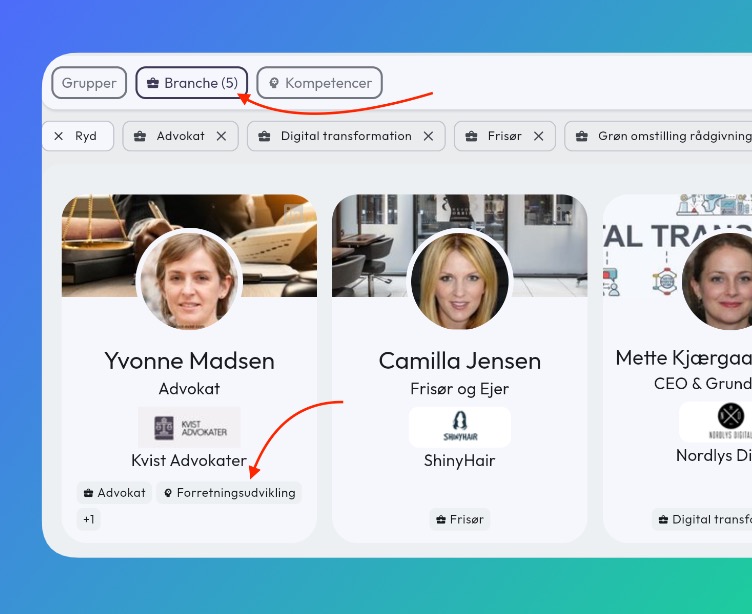
It’s important for your members to be able to find each other quickly — whether they’re on the go sharing contact information or looking for their next 1-to-1.
Member tags let you categorise members and make them filterable directly in the member list, for both you and your members. For example, you can add industries, areas of responsibility, competencies, and more.
Watch the video or read how to get started here: https://samli.io/guides/member-tags
Quick start:
- Go to Administration -> Organisation -> Member tags
- Create your first category and add tags that can be used.
- Choose whether members can select their own tags, or do it yourself under Administration -> Users — select a member and add tags there.
Document folders
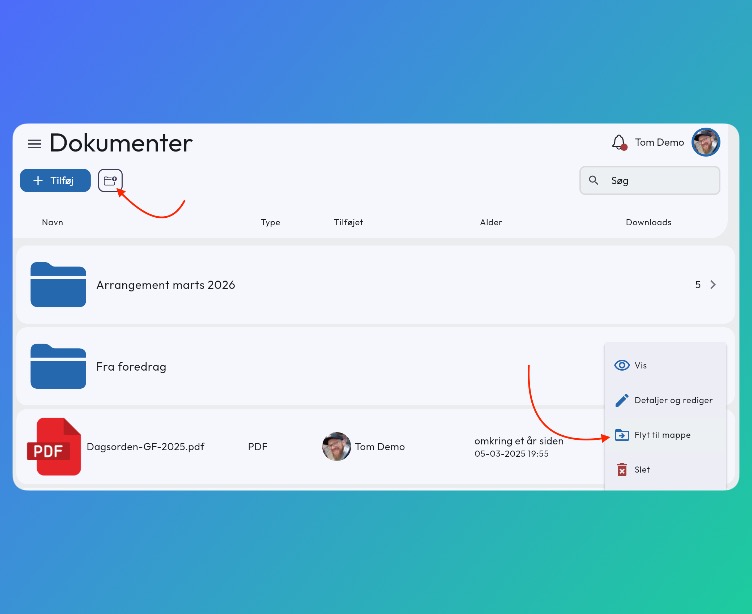
It’s finally possible to create folders for your documents in groups.
Under Documents there is now a “create folder” icon next to the “Add” button. You can also create and move a document by clicking ”…” next to the document and selecting “Move to folder”.
Watch a short video or read how here: https://samli.io/guides/folders
New onboarding email flow
When you invite new members, we now send up to 4 invitation emails if the member hasn’t logged in within 10 days.
- The first email is sent as soon as you add the member (unless the group is in draft).
- Sent after 3 days, showing the next meeting they are invited to.
- Sent after 6 days, also showing the group admin’s contact information with the subject “Having trouble getting in?“.
- Sent after 10 days with a focus on meetings and the group admin’s contact information.
Under the member’s profile you can track when the member last received an email.
More improvements
- Online meetings now send a specific email with the meeting link on the day the meeting takes place.
- Made it faster to create content from the overview page with “quick buttons”.
- Add new users directly in the user list in administration.
- When reopening the app after some time, it now stays on the same page you were last on.
Bug fixes
- When using the same login email, the user is now correctly prompted to request a new email.
- Long profile names are now displayed correctly.
- When a profile is shared via email, the text is now displayed with correct formatting.
- The navigation bar on Android phones was not always fully visible.
- Correct display of date names based on the selected language.
- When tapping a notification, the app now correctly shows the new content.
- Notifications — the “mark all as seen” button now works as expected.